Showing posts with label Maltrail. Show all posts

Tuesday, June 28, 2022

Suricata: DataSets for IOCs

 After reviewing MalTrail, I wanted to see if there were other ways to provide the same/close to the same type of information based on software I was already using.  This led me to Suricata and IPREP, and DATASETS.  

While reading up, I found an article over at IDSTower about Datasets, and figured this would be a good starting point for comparing the two applications.   

The article was setting up Datasets for bad domains, and  based on the instructions it would be an easy add to Security Onion without having to really mess with any of the Salt files (I believe IPREP I will have to make some changes to Salt files, but that will be another article.)

Overall the process was pretty simple, I did change one thing, instead of adding iocs.rules, I added my rule to local.rules, and ran so-rule-update.   I believe to add the iocs.rules as a separate source I will have to edit the Salt file for the IDSTools Docker. 

After I had set up the new rule, I did a nslookup to a bad site:  (From the Alerts Pane).  


I think I will have to make a custom alert to see more information on these, or maybe a dashboard might work.  

I would like to see the name of the bad IP/DNS entry, and possibly the country/region for the IP/DNS for a quick alert view pane.  

Now MalTrail looks like:  (screen capture taken from their Demo)


I would think to get the "info" section I would need to break out the DataSets per type of IOC as the Alert Description, the other ones are pretty standard fields I could pull.

Next, I think I will try and pull the MalTrail data into Logstash in SecurityOnion, think I read somewher e there is a Logstash setting in MalTrail, or it should be pretty easy to use the data file created from MalTrail to ingest into Logstash.  


Wednesday, June 22, 2022

MalTrail - Day 2

 So back on working on MalTrail for the second day.  I am able to access the web front end, but still no data is coming through.  

First thing I tried was to edit the interfaces in the maltrail.conf from any to ens34 (The current sniffing interface on Security Onion).  It might be better to use Bond0 as in 2.3 they use a bonded interface.  

Restarting the docker (Docker restart maltrail).    No new errors in the /var/log/maltrail/error.log, but also no traffic showing in the application. 

Next step:  docker exec -it maltrail bash to get into the Docker container.  I am going to kill both python programs and try and restart them. 

  • pkill server.py
  • pkill sensor.py
  • python server.py
Well starting server.py crashes the python program as it cannot find ens34.  So now to the next question how do I bond a passive interface to a Docker container?

I decided to look at how the Suricata Docker container is being used.  

docker inspect so-suricata

Looks like it's an environment variable setting it to the bond0.   

Reading up on setting up a Docker container per-interface looks like you have to have an ip address associated with the interface (could be wrong). 

Next, I read up on --net=host, but that might also cause other issues as the ports are dropped possibly between the Docker container and the host? (That's how I read it)

I do know that Security Onion uses a Docker network, but like before trying to keep things on the same server but separate.  


Tuesday, June 21, 2022

MalTrail - SecurityOnion@Home (Try)

 I was reading up on MalTrail, and wanted to get that up and operational on my SecurityOnion VM (I know it probably can't handle it, but there is no fun in that).  At the moment I am not sure how cpu/ram intensive MalTrail is,  but I did see that it has been dockerized.  

One thing of note, is I am going into this knowing that it will be unsupported by the SecurityOnion team,  which is understandable.  

So with that, I am playing on my home setup of SecurityOnion, which I often test things with.  

Below is a screenshot of the Docker instructions.  


Seems easy enough, I made a slight change to the export location. and skipped the apt parts :), since I am using CentOS, and would like to limit the application installed.   

The for line I also skipped as the the sniffing port is already set to promisc

I could have added the Docker container into SecurityOnion elastic-net, but that could cause other issues down the road.  

The install went pretty easy, no errors that I could see, but I could not access the site.  

http://localhost:8338  

My thoughts were that I needed to open the firewall for this.    Reading up on SecurityOnion looks like I needed to create a Portgroup, and then add it to the INPUT for Standalone? 

*This is a standalone install of SecurityOnion

  • so-firewall addportgroup maltrail
  • so-firewall addport 8338
  • salt system_standalone state.apply firewall
 Tried again to access http://localhost:8338  (No Success)

Next I tried  netstat -tulnp | grep LISTEN

Which looks like this:


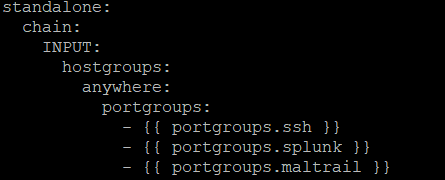
This is the file I edited: /opt/so/saltstack/local/salt/firewall/assigned_hostgroups.local.map.yaml.


Reading more into this, I think I needed to add the ports to the Analyst Role, but I could be getting confused, cause I also see that its referencing the file: /opt/so/saltstack/local/pillar/minions/<HOSTNAME>_<ROLE>.sls

------------------

After this whole write-up, I figured it out.  I used the documentation from SecurityOnion and this section.  

Basically I added the maltrail port group to the Analyst role for the standalone machine through the standalone.sls file.   

---Now to figure out why its not actually reporting anything.